PCI DSS
How cside meets and exceeds PCI DSS v4.0.1 requirements 6.4.3 and 11.6.1 for payment page script and header monitoring, and how to set it up.
cside’s PCI Shield uses client-side security and client-side protection controls to protect payment pages from Magecart, e-skimming, formjacking, and other attacks that run in the customer’s browser. This page explains how cside maps to PCI DSS Requirements 6.4.3 & 11.6.1 and how to configure audit-ready evidence.
What is PCI DSS?
The Payment Card Industry Data Security Standard (PCI DSS) is a set of guidelines that ensures the safety of card transactions globally. Created by the PCI Security Standards Council, its goal is to protect against data theft and fraud in debit and credit card transactions.
PCI DSS v4.0.1 introduces two requirements that govern the scripts and headers delivered to a cardholder’s browser on payment pages:
- 6.4.3 covers script authorization, integrity, and inventory.
- 11.6.1 covers change and tamper detection for security-impacting HTTP headers and payment page script content.
You can read the full specification on the PCI Security Standards Council website.
Two deployment modes, both compliant
cside offers two monitoring modes. Both satisfy 6.4.3 and 11.6.1. Choose based on your risk tolerance and ability to deploy code changes.
Scan method (no code change)
- Runs full browser containers (not single HTTP fetches) twice per day against the entire web property and the user flow leading to the payment page.
- Monitors scripts as the DOM renders in full, including sub-requests and late-loaded assets that naive HTTP scanners miss.
- Mimics real user behavior so dynamically injected and CDN-rotated scripts are captured.
Twice-daily scans exceed the “at least weekly” requirement in 11.6.1 and meet the periodic inventory expectation in 6.4.3.
Script method (runtime, inline)
- Loads inline in the live user session and logs every script and every script action in real time to cside’s backend.
- Provides request-level visibility in the dashboard.
- Enables granular enforcement: cside can block specific actions or stop scripts altogether.
- Interoperates with CSP. cside also prevents malicious scripts from injecting CSP directives that would disable the cside script itself, a behavior we have not observed in any other solution on the market.
Scan and script modes can be combined with CSP, SRI, and your own allowlists. cside does not require you to disable existing controls.
Requirement 6.4.3
All payment page scripts that are loaded and executed in the consumer’s browser are managed as follows…
”A method is implemented to confirm that each script is authorized.”
PCI DSS permits both pre-authorization and post-authorization models. cside supports both:
- Scan method: scripts discovered on the payment page and its user flow are surfaced in the PCI DSS dashboard for review and authorization by a named user. The dashboard and audit log record who authorized each script and when.
- Script method: in addition to dashboard authorization, cside can technically prevent unauthorized scripts or specific script actions from executing at runtime. This works alongside CSP and continues to function even when an attacker attempts to inject CSP directives to disable cside.
Authorization decisions, the authorizer’s identity, and timestamps are written to the audit log and are exportable for your QSA.
”A method is implemented to assure the integrity of each script.”
cside verifies integrity on multiple axes rather than relying on a single hash check:
- Payload hashing: every script body is hashed. A new hash triggers the full analysis pipeline.
- Content analysis pipeline: new payloads are deobfuscated, prettified, and evaluated through our proprietary Rust-based rules engine, Yara rules, a locally hosted small-context LLM, larger models for deep analysis, and a human review step by the cside team.
- Source metadata verification: each script source is checked against SSL issuer history (to catch hijack attempts), domain registration and ownership history, DNS and NS record changes, RPKI status of the resolving IP addresses (to catch BGP leaks), and reverse DNS to detect infrastructure overlap with known malicious domains.
- Historical context: cside retains prior hashes served behind the same URL so integrity changes across versions can be audited. The dashboard surfaces every hash variant and renders the payload for inspection.
”An inventory of all scripts is maintained with written business or technical justification as to why each is necessary.”
The PCI DSS dashboard is purpose-built for this clause:
- A live inventory of every script detected on payment pages, including the parent object that caused it to load.
- AI-generated business and technical justifications derived from the payload and its behavior (explicitly permitted by the PCI SSC), which a user then reviews and confirms.
- Per-script audit entries recording who accepted or edited each justification, with a full revision history.
- Prettified payloads with sensitive browser APIs highlighted inline so reviewers can make informed justification decisions.
This includes dynamically injected scripts, CDN-rotated assets, scripts with changing IDs or timestamps, and nested sub-requests. Browser extensions are out of scope of PCI DSS because they imply prior device compromise, but cside still surfaces extension-injected scripts where detectable.
Requirement 11.6.1
A change and tamper detection mechanism is deployed…
”To alert personnel to unauthorized modification of the security-impacting HTTP headers and the script contents of payment pages as received by the consumer browser.”
cside captures headers and script content as they arrive in a real browser, not as returned by a server-side fetch. This is important because many sites serve different headers and scripts based on User-Agent, TLS fingerprint, bot detection, and geographic routing.
Monitored security-impacting headers:
- Content Security Policy
- Content Security Policy Report Only
- Report To
- Reporting Endpoints
- Strict Transport Security
- X-Frame-Options
- Cross-Origin Resource Policy
- Cross-Origin Opener Policy
- Cross-Origin Embedder Policy
- Permissions Policy
- X-Content-Type-Options
- X-Permitted-Cross-Domain-Policies
- Referrer Policy
- X-XSS-Protection
cside treats every hash change as a new script. Each time the payload changes, the new hash is automatically deobfuscated and run through the full detection pipeline. Alerts are not fired on the fact of change itself, they are fired when the analysis finds something wrong.
Concretely:
- Every hash change is analyzed as a new script. New scripts, removed scripts, modified payloads, and behavioral deviations (new network destinations, new DOM APIs, newly accessed storage surfaces) are all captured and evaluated. Detection is not signature-based on the parent script.
- Alerts fire on misbehavior. If a hash variant behaves in a way it shouldn’t, or if anything concerning surfaces (known-bad sources or payloads, CSP tampering attempts, exfiltration-class behavior, cross-threshold threat scores, novel obfuscation patterns), cside alerts in real time through your configured notification endpoints.
- Routine inventory is reported periodically. The weekly PDF report (configurable to daily) lists every script detected on the payment pages, every payment page URL, every security header change, and every business justification with its author. This satisfies the “at least weekly” clause of 11.6.1.
This exceeds the standard. 11.6.1 requires periodic evaluation; cside runs per-hash analysis continuously and layers immediate alerts on top of that.
”The mechanism is configured to evaluate the received HTTP headers and payment pages.”
cside evaluates the headers and payload as rendered in the browser. Where headers are not normally exposed to a script in the page, cside uses the browser context to obtain them. If your payment pages are behind a VPN or in a locked-down environment, cside provides a static IP so the scanner can reach them.
”The mechanism functions are performed at least weekly, or periodically at the frequency defined in the entity’s targeted risk analysis (Requirement 12.3.1).”
- The scan method runs twice per day.
- The script method runs continuously, in the live user session.
- A weekly PDF report is sent by default, summarizing all security header changes, every script detected on the payment pages, every payment page URL, and every justification (including who authored it). This cadence can be increased to daily.
- Malicious script detections are alerted immediately, out of band from the weekly report.
Alerts and reports can be routed to Linear, Jira, AWS S3, Slack, Discord, or any webhook endpoint. Larger organizations typically integrate cside with their existing change management and SIEM tooling.
QSA approval
cside has a 100% QSA approval rate. We work directly with major banks, payment providers, and QSA firms. A whitepaper signed by VikingCloud is available on our trust center, and most QSA firms have reviewed the solution.
Where cside goes beyond the requirement
PCI DSS sets a floor, not a ceiling. The following capabilities exceed the letter of 6.4.3 and 11.6.1:
- Layered detection pipeline: Yara rules, a proprietary Rust rules engine, small-context LLMs, large LLMs, and human review. Most competitors rely on third-party threat feeds alone.
- Source provenance checks: SSL issuer deltas, domain and DNS history, RPKI validation, and reverse DNS on resolving IPs.
- CSP tampering resistance: cside detects and blocks attempts by malicious scripts to inject CSP directives that would disable the cside script.
- Request-level visibility: each sub-request made by a script is logged with its parent object.
- Deobfuscation and prettification: the dashboard shows the human-readable version of every payload with sensitive APIs highlighted.
- Continuous public-web research: cside researches non-customer sites to surface novel attacks before they reach customer payment pages.
Setting up the PCI DSS dashboard
Navigating to PCI DSS settings
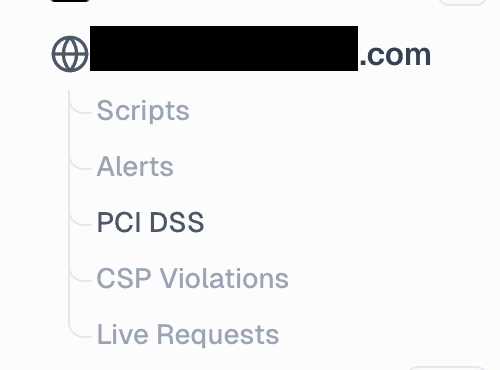
To access the PCI DSS dashboard, open the dashboard and then:
- Select your domain from the sidebar
- Select PCI DSS
Adding payment pages
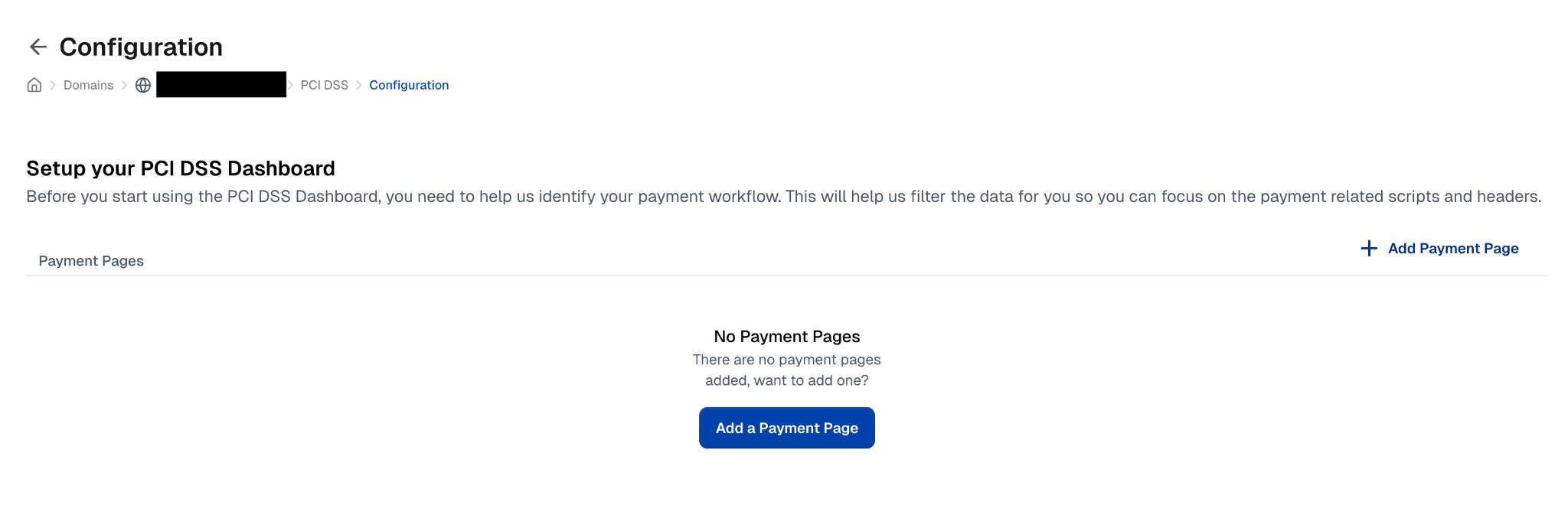
Before you start using the PCI DSS dashboard, you need to identify your payment pages. This helps filter the data so you can focus on payment-related scripts and headers.
- Click Add a Payment Page or + Add Payment Page
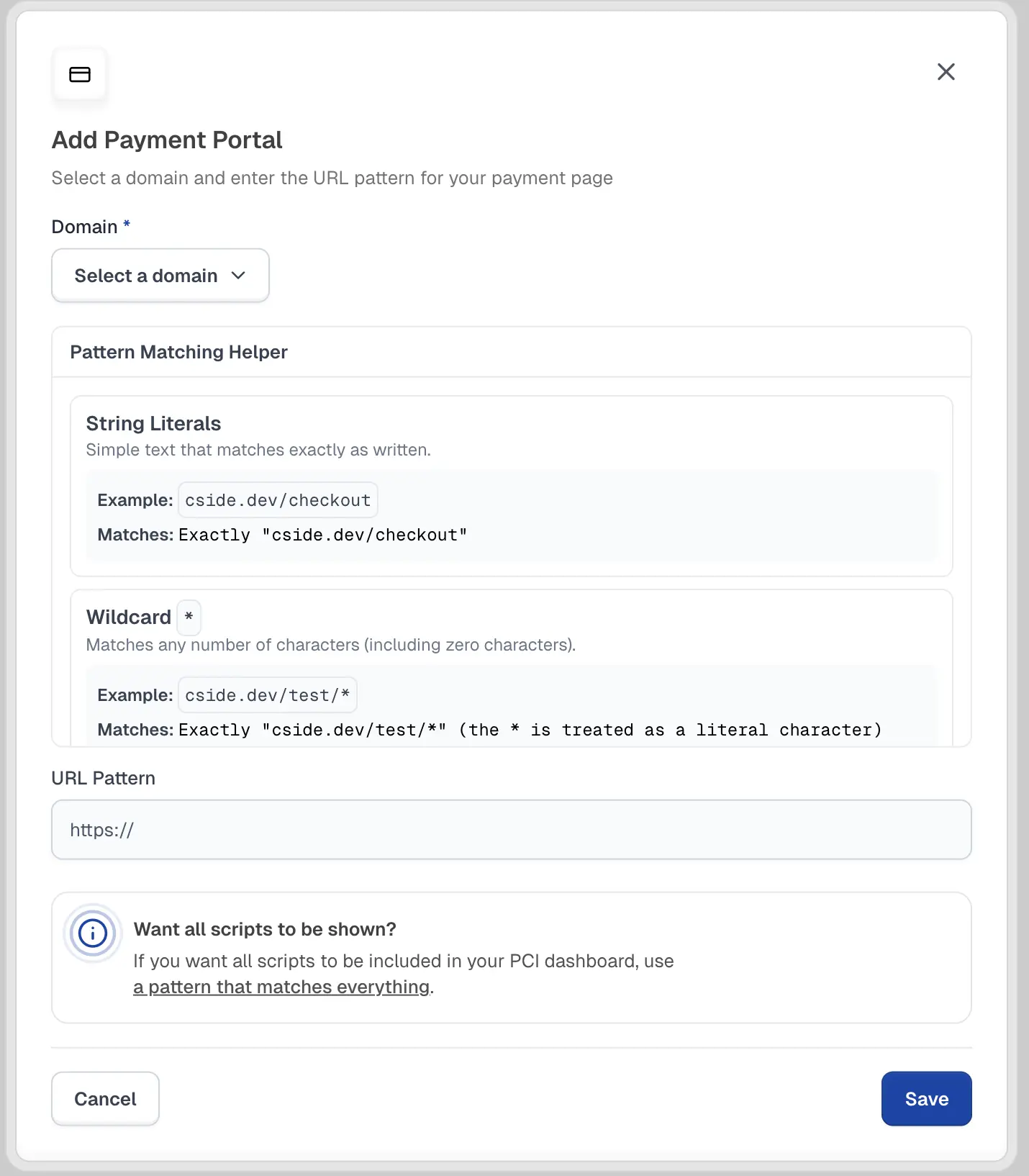
- Enter the payment page URL using the script pattern matching format
- Click Create
If you want all scripts to be included in your PCI dashboard, use a pattern that matches everything.
Page vs modal setup
There are two main setup options depending on your payment implementation:
Page setup
Use this option if your payment pages are:
- Server-side rendered (SSR)
- Loaded through a page reload/navigation
- Isolated from scripts present during client-side navigation
This setup filters the script list to only show scripts present on designated payment pages.
Modal setup
Use this option if your payment forms are implemented through:
- Modal windows
- Popup widgets
- Paywall overlays
- Any dynamic UI where payments can be processed on multiple pages
This setup monitors scripts across your entire application since payment forms can appear on any page.
Configure using a CSS selector that identifies your payment modal/form.
Example selector:
#payThe dashboard will display all scripts that could potentially interact with the payment form when it’s active.
Frequently asked questions
What do PCI DSS Requirements 6.4.3 & 11.6.1 require?
PCI DSS Requirement 6.4.3 requires payment page scripts to be authorized, checked for integrity, inventoried, and justified. Requirement 11.6.1 requires change and tamper detection for security-impacting HTTP headers and payment page script content as received by the consumer browser.
How does client-side security protect payment pages?
Client-side security protects payment pages by monitoring the scripts that execute in the browser, detecting unauthorized changes, and alerting when script behavior suggests data theft or tampering. cside adds runtime visibility so teams can see what third-party scripts load, what they request, and whether they interact with sensitive checkout flows.
How does cside address Magecart, e-skimming, and formjacking?
cside analyzes script payloads, sub-requests, source metadata, and runtime behavior for signs of Magecart, e-skimming, formjacking, and related browser-based attacks. When cside detects malicious behavior, it can alert your team and, in script mode, block the script or specific script actions.
Is scanner-only mode enough for PCI DSS?
Yes. The scan method is designed to satisfy the periodic inventory and change-detection expectations in PCI DSS 6.4.3 and 11.6.1. The script method adds continuous runtime monitoring and blocking for teams that want stronger client-side protection beyond the minimum compliance bar.
How do cside reports help QSAs and audit evidence?
cside reports show payment page URLs, detected scripts, header changes, authorization decisions, business justifications, authors, and timestamps. This gives QSAs evidence that payment page scripts are tracked and reviewed instead of relying on screenshots or manual spreadsheets.
Does cside enforce script controls or only monitor?
Both, depending on the mode. The script method can block scripts and specific actions at runtime and also blocks CSP injection attempts aimed at disabling the monitor. The scan method is monitoring only by design. PCI DSS explicitly allows post-authorization scanners, and the PCI SSC has confirmed this directly.
How real-time is detection?
The script method runs inline in the user’s session and wraps most browser APIs to observe how scripts mutate the DOM, so analysis happens as scripts execute. The same payload hash is not analyzed twice because there is no security value in doing so. 11.6.1 does not require 100% session monitoring; periodic evaluation is sufficient, and cside meets both the periodic and continuous bars.
How does cside handle novel or obfuscated attacks?
Detection is not signature-based on the parent script. cside logs every sub-request made by a script, deobfuscates payloads before evaluation, and runs AI deep analysis on anything that crosses its risk threshold. Novel and zero-day payloads are a specific design target. See Threat Detection for the full detection pipeline.
How are business justifications tracked?
The PCI DSS dashboard records every justification in the UI and in the audit log, including who authored or edited it and when. AI-generated justifications are explicitly allowed by the PCI SSC and are presented to the reviewer for confirmation rather than auto-accepted.
Related pages
Thanks for your feedback!