Detect account sharing
Prevent unauthorized account sharing and enforce license seats. Tag telemetry with the account that is signed in, then read the account_shared_detected rule from your backend to see when one account is used from more devices than you allow.
One set of credentials, used by more people than paid for them: the shared subscription, the two seats quietly running eight people, the resold account. None of it looks unusual in your own logs, because every one is a successful login with the right password.
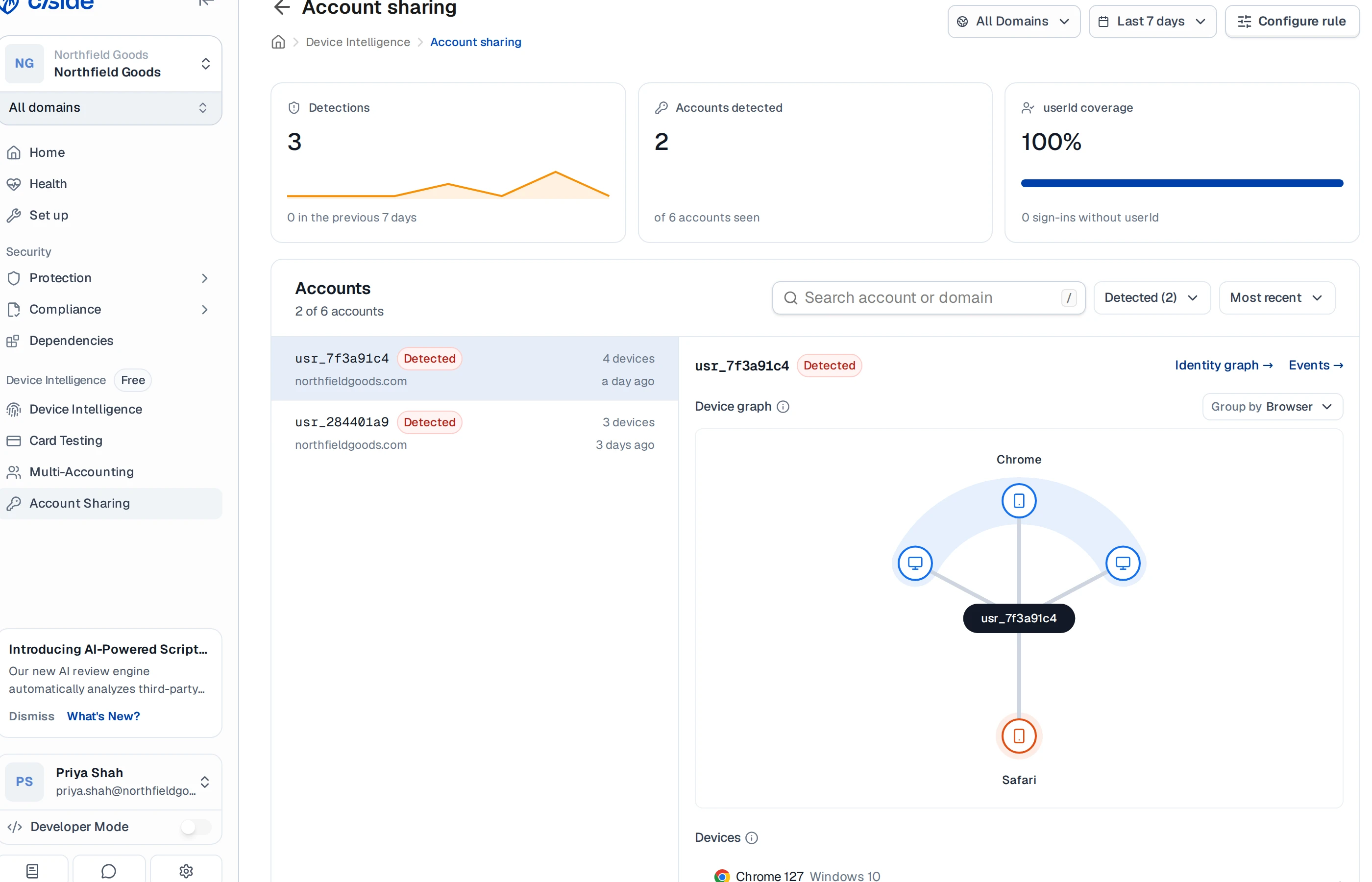
Device Intelligence adds what the logs lack: a device identity on every session. Tag your telemetry with the account that’s signing in, and the verdict reaches your backend during the sign-in itself. In the dashboard you also get the shape of it: which devices, signing in from where, whether sessions overlapped, and whether the account hopped regions faster than anyone can travel.
The same mechanism enforces license seats. Set the limit to the number of seats sold, and the rule tells you when a customer has quietly outgrown them.
How cside detects account sharing
Tag your telemetry with the account id of whoever is signed in. cside counts the distinct devices seen for that account inside a rolling window, and when that count crosses your site’s limit, the rule fires.
This is two halves, and they run in different places:
- Your browser calls
sendClientTelemetry({ userId })and gets back a token. - Your server sends that token to cside and reads the verdict.
Keep the verdict check on your server. Your Device Intelligence API key can’t go near browser code, and a verdict the browser could read is a verdict the browser could forge.
What you’ll need
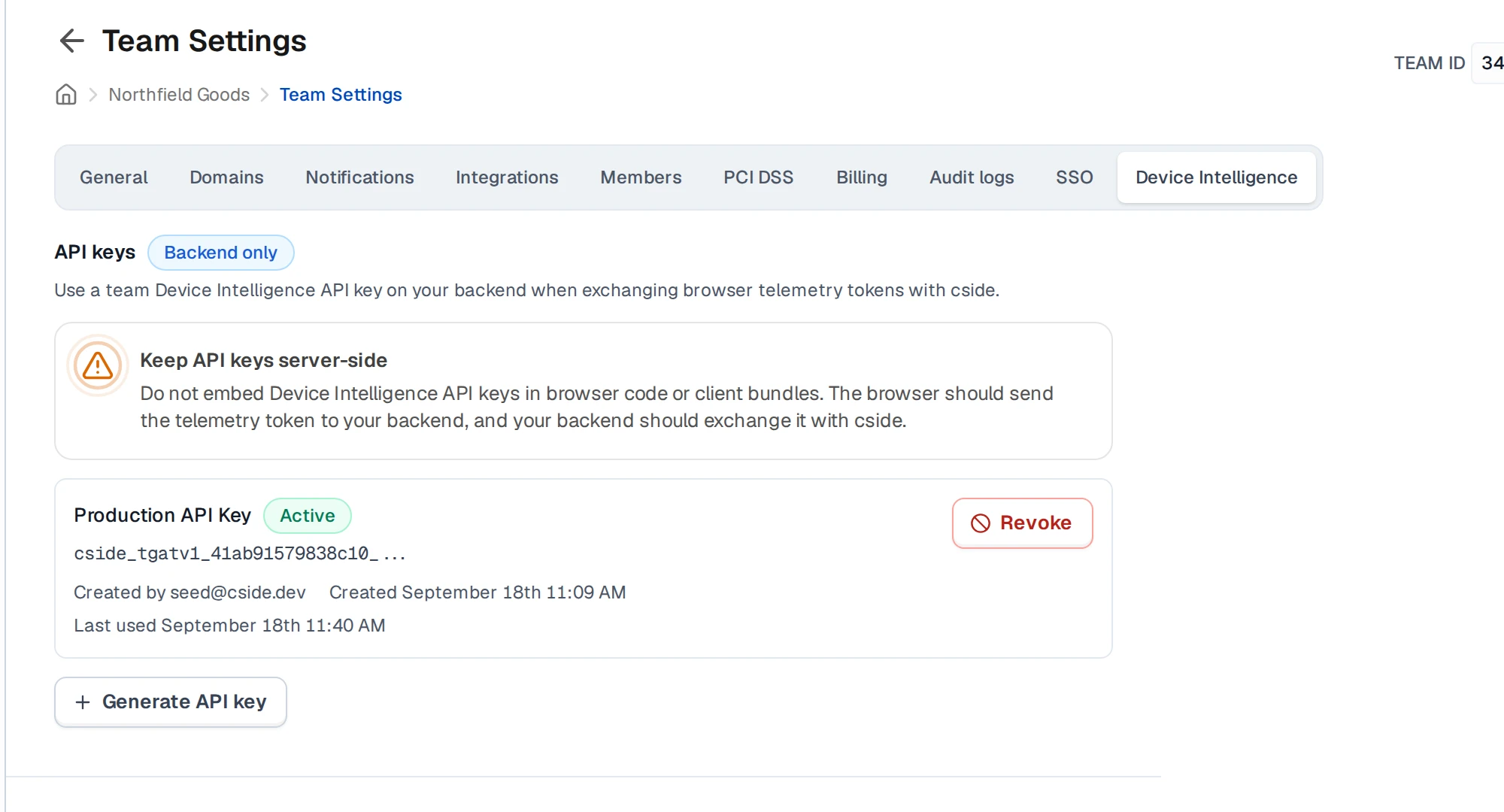
- Device Intelligence enabled on the domain
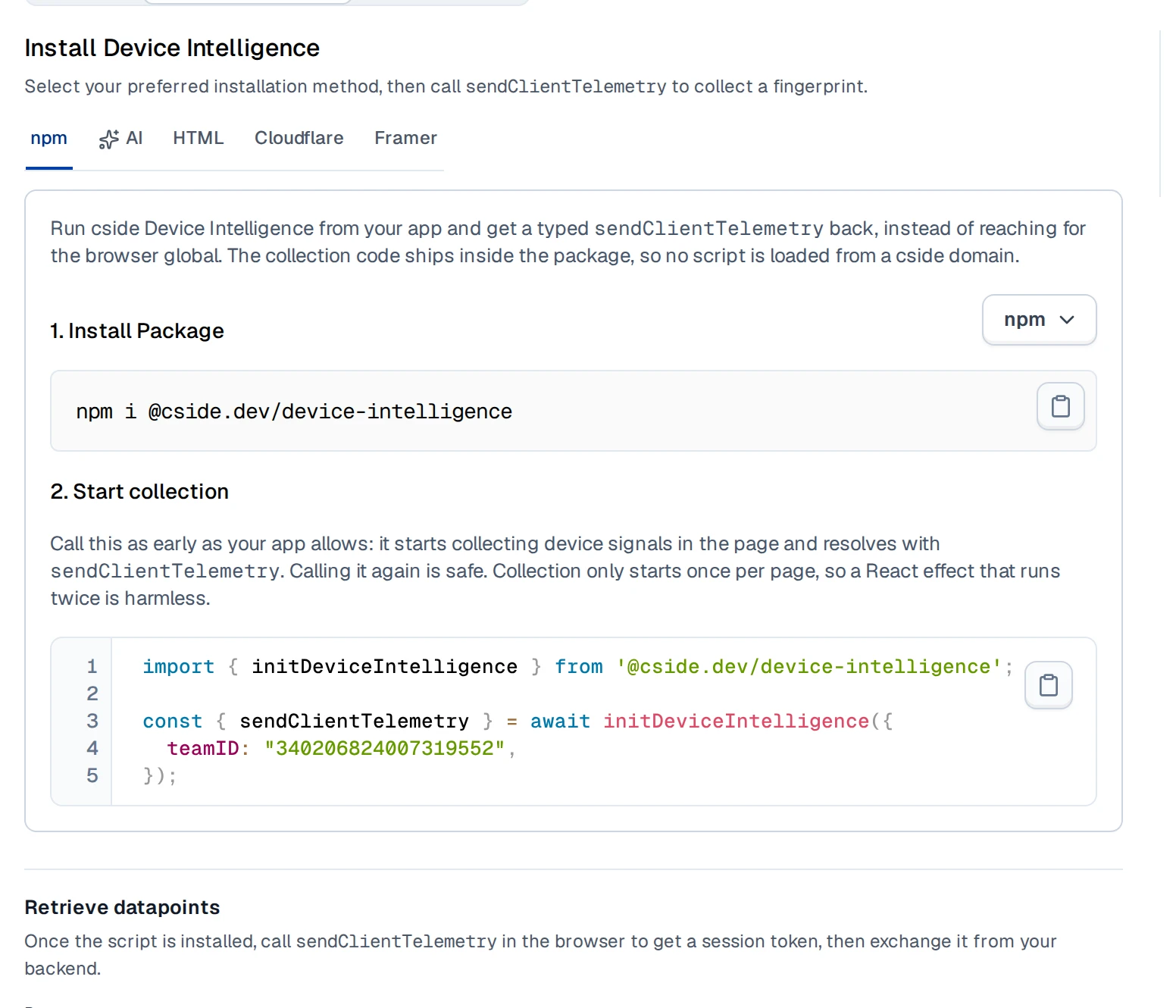
- The script installed and
sendClientTelemetrybeing called: see Set up Device Intelligence - A backend Device Intelligence API key: see Events API
- The rule switched on for your domain. Self-serve activation doesn’t exist yet, so ask cside to turn it on
In the browser: send the account id
Tag telemetry with userId
Call sendClientTelemetry once on page load with no userId, so collection starts early, then call it again with userId attached as soon as you know who’s signed in. Hand the token it returns straight to your own backend; the browser doesn’t do anything else with it.
You can call it again whenever you want a fresh reading, not just at sign-in. Each call produces a new evaluation, so on long-running sessions a periodic call keeps the device count current instead of leaving you with a verdict from whenever the person last logged in.
import { initDeviceIntelligence } from "@cside.dev/device-intelligence";

const { sendClientTelemetry } = await initDeviceIntelligence({
  teamID: "[your-team-id]",
});

// Call this at sign-in, and anywhere else you want to refresh the reading:
// long-running sessions benefit from a periodic call.
async function onSignIn(userId) {
  const { token, errors } = await sendClientTelemetry({ userId });

  if (errors) {
    console.error(errors);
    return;
  }

  // Your own backend route, not a cside endpoint. It does the actual
  // verdict check server-side; see the next section.
  await fetch("/api/account-sharing-check", {
    method: "POST",
    headers: { "Content-Type": "application/json" },
    body: JSON.stringify({ token }),
  });
}userId is the default, not a requirement. What matters is that the key you send and the key the rule reads are the same, spelled identically. Send accountId or user_id against a rule still set to userId and it isn’t an error: the value reads as permanently missing, and you’ll see outcome: 3 on every evaluation instead of outcome: 1 or outcome: 2. If you already send a different key, cside can point the rule at it instead. See Already sending a different id?.
userId and every other external id are stored and included in exports. Send an opaque account identifier, not an email address, name, or anything else you wouldn’t want to persist.
Already sending a different id?
You don’t have to switch to userId. What matters is that the rule reads the same key you send, and cside can rebind the rule, so nothing changes in your client.
The key does have to be one of userId, accountId, organizationId, or teamId. Those are the only four the rule can key on, because keying needs a field with a bounded set of values. email, orderId, and anything else can still be sent and stored, they just can’t be the key, so send one of the four alongside whatever you already use.
On your server: read the verdict
This is the /api/account-sharing-check route from the previous step. It exchanges the token for the full evaluation and decides what to do, all server-side, with your Device Intelligence API key.
curl https://api.cside.com/token/v2/verify \
  --request POST \
  --header "Authorization: Bearer $CSIDE_FINGERPRINT_API_KEY" \
  --header "Content-Type: application/json" \
  --data '{"token":"'"$CSIDE_FINGERPRINT_SESSION_TOKEN"'"}'
The endpoint returns 202 Accepted with { "status": "pending" } while evaluation is still running, then 200 OK once it’s done. Poll up to about 3 times, roughly 3 seconds apart as a safe upper bound: the rule engine runs synchronously as part of storing the result, so the verdict is typically ready on your first poll. And it’s ready in full: rule_evaluations_v2 is populated at the exact moment status becomes "completed", never later, so once you see "completed" an absent entry is genuinely absent, not still on its way. If you run out of retries and it’s still pending, treat it as no verdict for this sign-in rather than blocking the person: the next sign-in produces a fresh evaluation.
Here’s the whole thing wired up: exchange the token, check it belongs to the account that’s actually signed in, then find the account-sharing entry and branch on it. Check both outcome and evaluated_as in the code itself, not just the rule slug: other rules, including someone else’s shadow experiment, can ride in the same array.
// apps/api-style illustrative route handler. Adjust to your own framework.
// The wire sends these as integers. Naming them keeps the check readable;
// the full set of values is in the tables below.
const OUTCOME_TRUE = 1;
const LIFECYCLE_ACTIVE = 3;

app.post("/api/account-sharing-check", async (req, res) => {
  const { token } = req.body;
  const evaluation = await verifyToken(token);

  // Trust your own session, never the browser. The userId on the telemetry is
  // whatever the page chose to send, so bind it to the signed-in account
  // before you act on anything.
  if (evaluation.fingerprint?.external_ids?.userId !== req.session.userId) {
    return res.sendStatus(409);
  }

  const sharing = findAccountSharing(evaluation);

  if (sharing !== undefined) {
    // This account is over your site's device limit right now.
    // Step up auth, cap sessions, flag for review: see "Decide what to do" below.
  }

  res.sendStatus(204);
});

async function verifyToken(token, attempt = 0) {
  const response = await fetch("https://api.cside.com/token/v2/verify", {
    method: "POST",
    headers: {
      Authorization: `Bearer ${process.env.CSIDE_FINGERPRINT_API_KEY}`,
      "Content-Type": "application/json",
    },
    body: JSON.stringify({ token }),
  });

  if (!response.ok) {
    // An expired key, a bad token, a rate limit. Never fall through: a failed
    // request is an outage, not a verdict of "nobody is sharing this account".
    throw new Error(`Device Intelligence verify failed: ${response.status}`);
  }

  const data = await response.json();

  if (data.status === "pending" && attempt < 3) {
    await new Promise((resolve) => setTimeout(resolve, 3000));
    return verifyToken(token, attempt + 1);
  }

  if (data.status === "failed") {
    // Evaluation itself failed. Don't treat this the same as "no entry":
    // a failure isn't the healthy case.
    throw new Error("Device Intelligence evaluation failed");
  }

  return data;
}

function findAccountSharing(data) {
  // An absent entry means the rule wasn't evaluated, not that it
  // evaluated to false.
  return data.rule_evaluations_v2?.values?.find(
    (v) =>
      v.evaluation.rule_slug === "account_shared_detected" &&
      v.evaluation.outcome === OUTCOME_TRUE &&
      // Shadow rules ride in the same array. Acting on one would enforce
      // an experiment that isn't live for your site.
      v.evaluation.evaluated_as === LIFECYCLE_ACTIVE,
  );
}The userId on a token is whatever the browser sent. Someone can leave it off, or put a different account there, so treating it as proof of identity lets them push observations onto an account that isn’t theirs, or keep their own account looking clean. Compare fingerprint.external_ids.userId against the account in your server session and refuse anything that doesn’t match. cside tells you what the browser claimed; only you know who is actually signed in.
outcome and evaluated_as are integers, not strings. Every evaluated, published rule reports an entry on every event, at whatever outcome it lands on: 1, 2, and 3 are steady states you’ll see continuously, not one-off blips. 4 is the exception, and it means something narrower than it looks: the rule needs a measurement that exists but hasn’t warmed up yet. That’s different from a status of "pending", which means the evaluation itself hasn’t finished and is what the polling loop above is for. Polling the same token harder won’t turn a 4 into a verdict; it clears on later evaluations as data accumulates for that account.
Same enum as the rule_evaluations_v2 reference; here’s what each value means for this rule specifically:
outcome | Meaning | When you’ll observe it |
|---|---|---|
0 | Unspecified | Not produced |
1 | True | Continuously, while the account is over your limit |
2 | False | Continuously, the normal state for a healthy account that isn’t over the limit |
3 | Missing (structural) | Continuously, if the rule can’t read userId from your telemetry, for example a wrong key |
4 | Pending (transient) | When the rule’s measurement isn’t warm yet. Not the same as status: "pending", and polling this token again won’t clear it |
evaluated_as | Meaning |
|---|---|
1 | Draft |
2 | Shadow: someone’s experiment, can appear at any time, don’t act on it |
3 | Active: the rule your site turned on |
4 | Archived |
One line on transition, useful if you’d rather act once than on every request: once you’ve already checked outcome: 1, transition: 3 means the account just crossed the threshold on this evaluation, and transition: 2 means it’s still over it from an earlier one.
The account that triggered the rule is on fingerprint.external_ids in the same response, not on evaluation.key. key is a hash of what the rule keyed on and never carries the plaintext account id. Also note that key.key_hash is a JSON string, not a number, and that this response body mixes two timestamp shapes: top-level created_at and updated_at are millisecond numbers, while evaluated_at and event_time inside the evaluation are { seconds, nanos } objects.
Elided example response, captured from a real evaluation, other fields omitted. Notice the second entry: other rules genuinely ride in the same array, which is why the code above matches on slug, outcome, and evaluated_as together, not slug alone.
{
  "status": "completed",
  "created_at": 1789731723590,
  "updated_at": 1789731723590,
  "fingerprint": {
    "device_id": "dev_3f8a21c9",
    "external_ids": {
      "userId": "acct_9f2a1c"
    }
  },
  "rule_evaluations_v2": {
    "values": [
      {
        "evaluation": {
          "rule_slug": "account_shared_detected",
          "outcome": 1,
          "evaluated_as": 3,
          "transition": 3,
          "key": { "key_hash": "16386830586737169487" },
          "event_time": { "seconds": 1789731723, "nanos": 590000000 },
          "evaluated_at": { "seconds": 1789731723, "nanos": 605000000 }
        }
      },
      {
        "evaluation": {
          "rule_slug": "multi_account_detected",
          "outcome": 2,
          "evaluated_as": 3,
          "transition": 2,
          "key": { "key_hash": "261153104274697293" },
          "event_time": { "seconds": 1789731723, "nanos": 590000000 },
          "evaluated_at": { "seconds": 1789731723, "nanos": 605000000 }
        }
      }
    ]
  }
}
Not shown above: some nested objects in the full response use camelCase field names instead of snake_case, where they share a wire format with the dashboard’s rule designer (inside explanation, and key.components[].dimension). If you print your own full response and see a mix of both, that’s expected, not a bug in your integration.
See the full rule_evaluations_v2 field reference for the rest of the fields.
Decide what to do about it
cside reports, it doesn’t block. What you do with a firing rule is up to you: step up authentication, cap concurrent sessions for the account, or flag it for manual review.
Confirm it’s working
First, confirm the id is actually arriving: exchange one token and check that fingerprint.external_ids contains the value you expect under userId.
Then check the rule itself, before anyone shares anything. Because every evaluated, published rule reports on every event, you don’t need to trigger sharing to see whether the pipeline works:
outcome: 2on theaccount_shared_detectedentry is what a healthy, correctly wired integration looks like: the rule is running, reading the right key, and nobody’s over the limit. This is your negative confirmation, and you’ll see it continuously, not just once.outcome: 3means you’re sending the wrong key. Fix it now, before testing further; see Already sending a different id?.- No entry for
account_shared_detectedat all means the rule isn’t activated for this domain yet, it’s a measurement-only rule that doesn’t publish, or evaluation didn’t run for this event. Ask cside.
Watch it flip to true
Once you’ve confirmed the healthy outcome: 2 baseline above, trigger the rule on purpose to see the full flow, including the transition:
- Sign into one test account from three different browsers or device profiles, inside a 2-hour span. Those are the shipped defaults; if your site’s limit or window has been retuned, use yours instead
- Exchange a session token after each sign-in and watch
account_shared_detected: it staysoutcome: 2for the first two, then flips tooutcome: 1(withtransition: 3) once the third device puts the account over your site’s limit - Confirm
evaluated_as: 3alongside it, so you know you’re reading the active rule and not a shadow experiment
Private browsing windows on the same physical machine may not read as distinct devices, so use separate browsers or device profiles rather than several private windows in one browser.
curl https://api.cside.com/token/v2/verify \
  --request POST \
  --header "Authorization: Bearer $CSIDE_FINGERPRINT_API_KEY" \
  --header "Content-Type: application/json" \
  --data '{"token":"'"$CSIDE_FINGERPRINT_SESSION_TOKEN"'"}'

# rule_evaluations_v2 carries the rule outcomes, account_shared_detected among them.
# If "status" is "pending", wait a few seconds and retry, up to about 3 times.
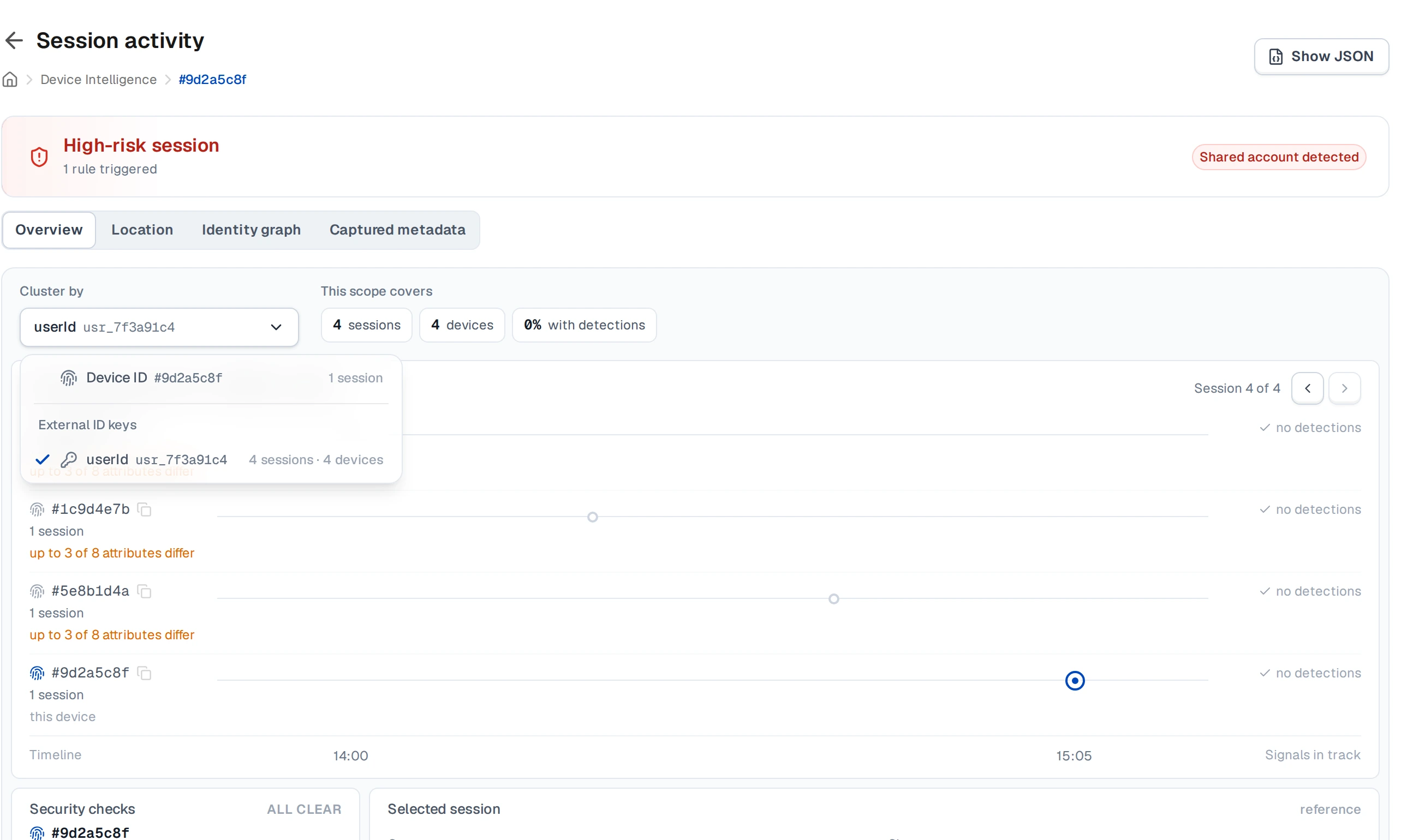
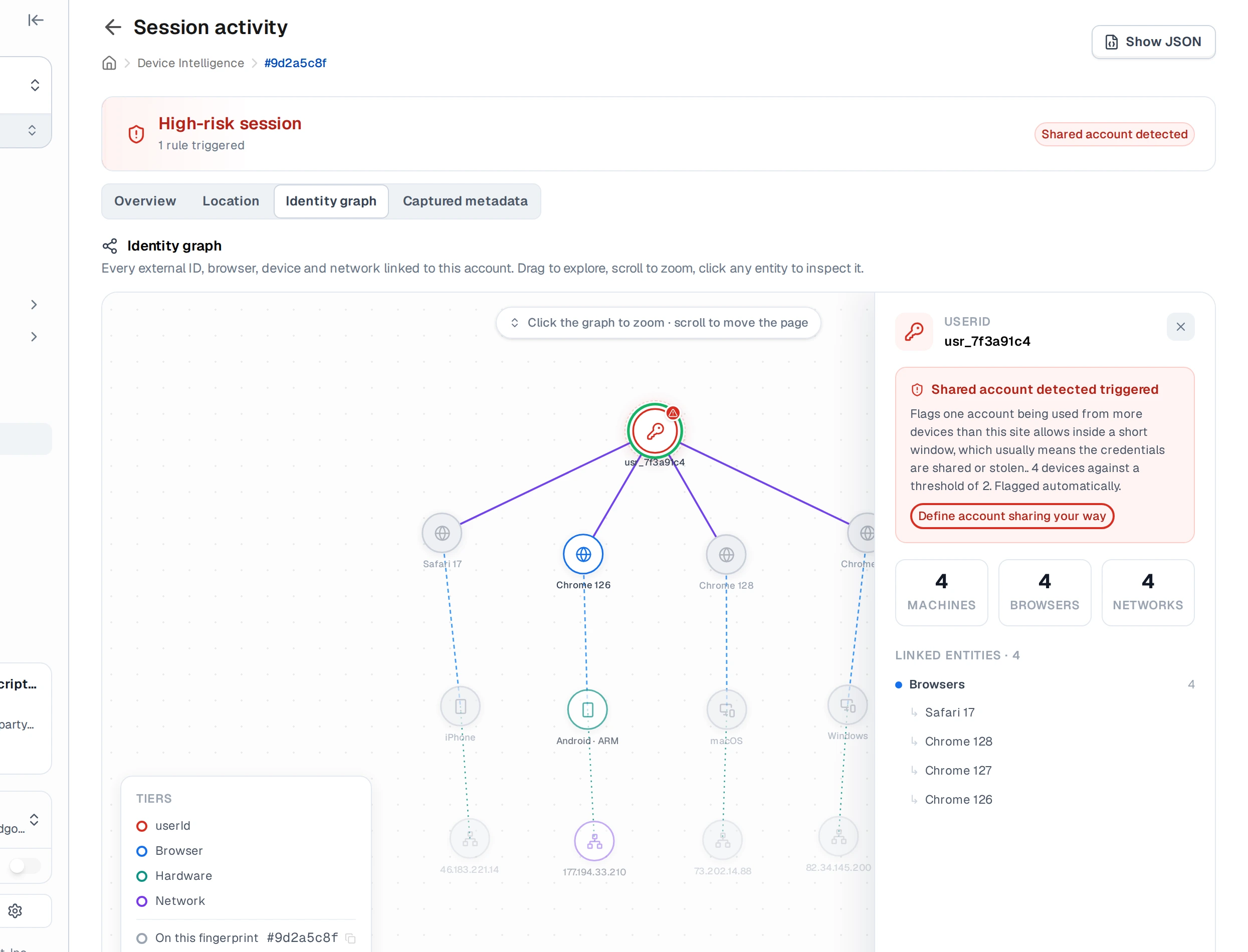
Once you’ve confirmed it in the API, open that session in the cside dashboard: its session detail page has an Identity graph tab that shows the same thing visually, one account fanning out to multiple device nodes.
If your team has access to the account-sharing use-case page in the dashboard, its coverage tile is the most direct way to catch a wrong key: it measures what fraction of your events actually carry the id the rule reads. That page is still early access, so it may not be switched on for you.
Next steps
Troubleshooting
Almost every integration that sees nothing has the same cause: the external id you send isn’t the one the rule reads. userId is the default rather than a requirement, so cside can rebind the rule to any of the other keyable fields. Your telemetry and the rule just have to agree on one.
- Check what arrived. Exchange a token and look at
fingerprint.external_ids. If your account id isn’t there,sendClientTelemetryran without it, or ran before you knew who was signing in. - Check the rule could read it. An
outcomeof3on theaccount_shared_detectedentry means the rule ran and couldn’t find its key. - Check the value is stable. A session id or a rotating token makes every login look like a new account, so nothing ever accumulates against one.
- Rebind rather than rewrite. Ask cside to point the rule at your key instead. See Already sending a different id?.
Thanks for your feedback!